
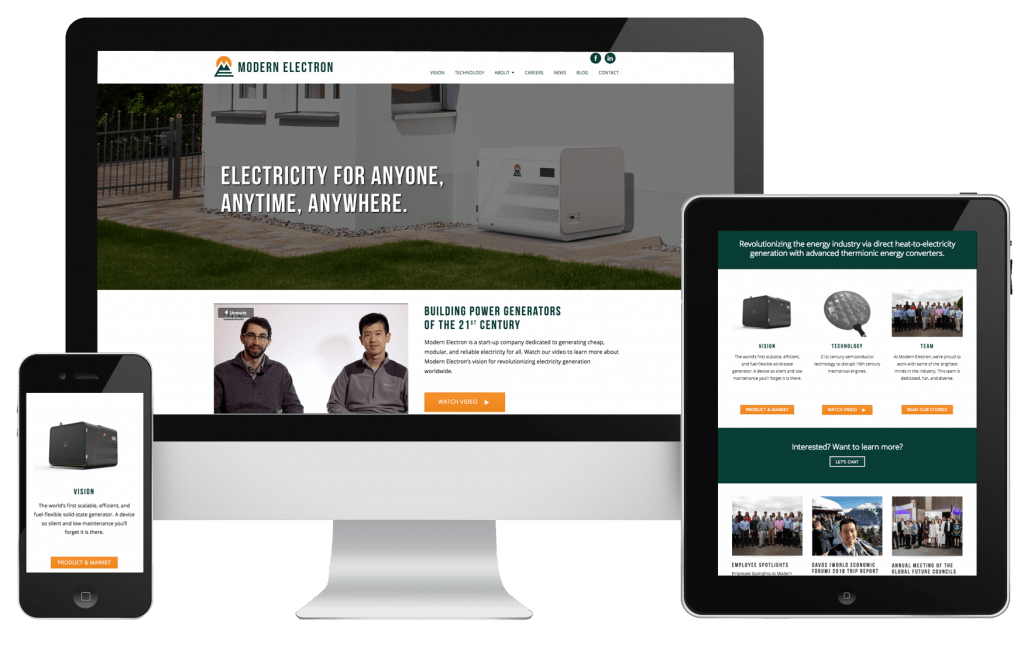
[vc_row][vc_column][gem_image position=”centered” disable_lightbox=”1″ effects_enabled=”1″ src=”24810″ alt=”Modern Electron WordPress Website designed by Handsome Meatball”][vc_column_text]
MORE IMAGES
[/vc_column_text][vc_gallery type=”image_grid” images=”24811,24812,24813,24814″ img_size=””][/vc_column][/vc_row][vc_row][vc_column css=”.vc_custom_1540846079005{margin-top: -5px !important;}”][vc_column_text]
DESCRIPTION
[/vc_column_text][gem_divider margin_top=”30″][vc_column_text]Modern Electron came to me with a WordPress website that did not fit with their brand standards or company message. They wanted to update the look and feel as well as the User Experience.
The team also wanted an online marketing presence and track the progress with Google Analytics.[/vc_column_text][gem_divider margin_top=”30″][vc_column_text]
PROCESS
[/vc_column_text][vc_column_text]
- Kickoff Meeting: We all sat down together to discuss what the client wanted the WordPress website to accomplish. We addressed the goals and target audience. At this time, we spoke about the budget, timeline, and responsibilities.
- Outline: Next, a framework for this project included the entire sitemap and user journey.
- Wireframes: With the outline developed, we could start wireframing how the website would function.
- Branding and Styling: We took the wireframes to the next level by applying the company brand. We chose a WordPress theme that was close to their brand. I customized it to suit their identity and target audience better.
- Copywriting: This process started in the background as soon as we had an outline set. The message is incredibly important when selecting a target audience and a goal for the website.
- Review: Using the Invision App, Modern Electron was able to leave comments on the designs. We were able to collaborate on our own schedules.
- Testing: This is a critical stage. We test that everything technically works so when we launched the website, there would be no complications.
- Approval and launch.
[/vc_column_text][gem_divider margin_top=”-17″][vc_column_text]
PROJECT REQUIREMENTS
[/vc_column_text][gem_divider margin_top=”31″][gem_diagram type=”line”][gem_skill title=”WordPress” amount=”100″ color=”#464c5c”]
[gem_skill title=”Branding” amount=”75″ color=”#6d747a”]
[gem_skill title=”Usability” amount=”80″ color=”#8c8274″]
[gem_skill title=”Javascript” amount=”54″ color=”#d2c6b4″][/gem_diagram][gem_divider margin_top=”31″][vc_column_text]
DEBRIEF
[/vc_column_text][vc_column_text]Communication is critical when launching a new website. When there are a lot of moving parts or many people with a say in the outcome, it can be a struggle to make sure no one voice is silenced or unheard.
For the organization of the text for the website, Modern Electron created a Google Drive document to collaborate with the whole team. We used Invision App for a place to comment on the wireframes and layouts. Discussions took place right on the design in real time in many locations.
We then took the upgraded branding to develop a brand book, business cards, templates, letterhead, and other important company documents. We updated their copy on the website for better SEO and SEM standards. Using Schema.org markup, I tagged their content for improved search engine traffic.[/vc_column_text][/vc_column][/vc_row]